Docs
Review and report
Mark changes as expected, bug or fixed, add notes, and export the upgrade report.
Every page gets a review state:
- Expected (
e): the change is intended, like a new header or a deliberate restyle. - Bug (
b): needs fixing. - Fixed (
f): was a bug, now fine.
Add a note: a ticket number, what changed, why it's fine. Notes save as you type. With Next page after marking ticked, marking a page moves you to the next one, so you can work down a filtered list quickly. Pressing the same state again clears it.
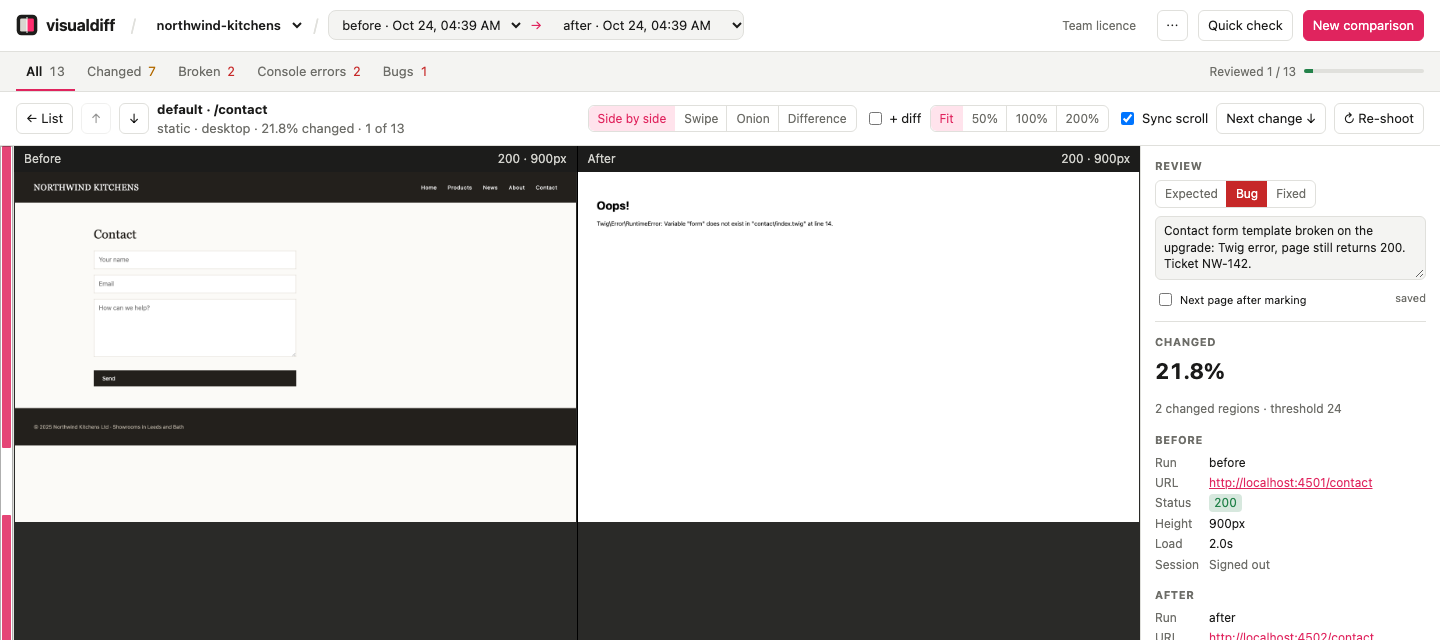
This page is a good example of what visualdiff catches: the contact page answers 200, so a status check alone would pass it, but it's a Twig error. visualdiff recognises it as an error page (200 ⚠, newly broken).
Reviews belong to the comparison and survive re-shoots: re-capture a page after a fix, and its note is still there for you to mark it fixed.
Tip: global changes#
A change that affects every page, like a new header, makes every page show as changed. Mark one page as expected with a note explaining it, then filter by a higher minimum % changed to find pages that changed beyond it.
Export the report#
Export → Markdown or CSV (top right of the list) produces the upgrade report: bugs first, then fixed, then anything that changed but hasn't been reviewed yet, then expected changes. Pages that didn't change are left out unless you ask for everything.
From the command line:
vdiff export before after --format md --out upgrade-report.md
vdiff export before after --format csv --all > every-page.csv