Docs
Licences and your account
The free version, signing in, seats and Macs, updates, working offline and what is sent to visualdiff.app.
Free version#
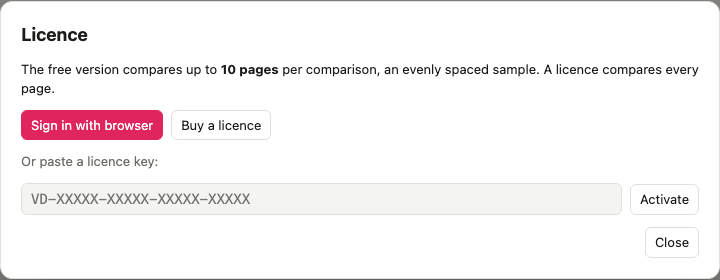
Without a licence, visualdiff compares up to 10 pages per comparison: an evenly spaced sample of the page list, identical on both sides, so every section and site still gets a look. It's the same sample every time, so full sweeps, page limits and choosing specific pages need a licence. Everything else works: branches, every page source, data comparisons, reviews, reports and Claude. There's no account and no time limit.
Sign in#
Licences are yearly, per seat (pricing). To use yours on a Mac:
- Choose the Free · 10 pages badge in the header (or Licence… in the visualdiff menu).
- Choose Sign in with browser. Your browser opens visualdiff.app with a code.
- Check the code matches the one in the app, pick which licence to use, and choose Approve.
The app picks it up within a few seconds. Or paste a licence key from your account instead.
From the command line:
vdiff license:login            # opens the browser
vdiff license:activate VD-XXXXX-XXXXX-XXXXX-XXXXX
vdiff license
Seats and Macs#
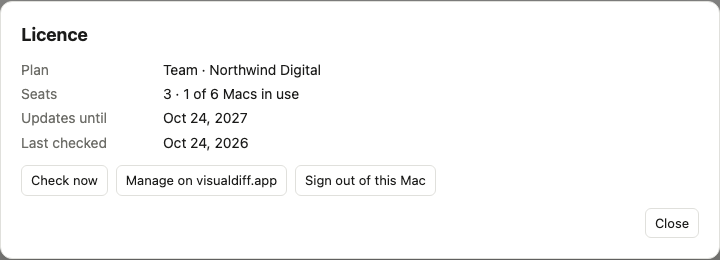
Each seat can be used on two Macs, so a three-seat Team licence covers six. In your account:
- Licence shows the key, seats, Macs in use and when updates run until.
- Macs lists every Mac signed in to your team's licences. Deactivate one to free its slot straight away; the app on it goes back to the free version next time it checks in.
- Members is where owners and admins invite people. Anyone on the team can sign their Macs in.
Signing out in the app (Sign out of this Mac, or vdiff license:logout) frees its slot too.
Updates#
A licence includes a year of updates. visualdiff checks for updates in the background, downloads them, and installs them when you quit (or choose Restart to update).
If you don't renew, nothing stops working: you keep using any version released while your licence was active, and the app is only offered those. Renew whenever you want the newer ones, from your account.
Working offline#
visualdiff checks in with visualdiff.app every few days to refresh the licence. Offline, it keeps working for 30 days from the last check-in. After that it goes back to the free version until it can check in again.
What leaves your Mac#
Only licence checks: your licence key or sign-in, an anonymous identifier for the Mac (a hash, not its serial number), the Mac's name (so you can tell your Macs apart in your account), and the app version. Screenshots, page lists, databases, URLs and reports never leave your Mac.
Buying for a team#
Owners and admins buy and manage licences from pricing and the account's billing page. Payments, VAT and invoices are handled by Stripe, who sell visualdiff on our behalf. Change the seat count, update the card or cancel the renewal from Invoices, seats and billing in your account.